
Kiro Spec-Driven Development
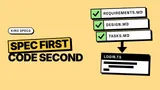
Mental model
Section titled “Mental model”In Kiro, the spec is the durable artifact and the code is derived from it. A prompt becomes three Markdown files — what to build, how to build it, and the steps — and you approve each one before the next is generated. A wrong sentence in a requirement costs seconds to fix; the same mistake found in generated code costs a rewrite. Chat history disappears, but a spec is version-controlled, reviewable, and still there when the feature changes.
The three spec files
Section titled “The three spec files”| File | Answers | Contains |
|---|---|---|
requirements.md | What | User stories, acceptance criteria |
bugfix.md | What is broken | Current, expected, unchanged behavior |
design.md | How | Architecture, data flow, interfaces |
tasks.md | In what order | Discrete, trackable tasks |
Every spec is a folder under .kiro/specs/ named after the feature. A feature spec starts with requirements.md; a bugfix spec has bugfix.md in its place. The phases run in order — requirements (or bug analysis), design, tasks — and each file is generated from the ones you already approved.
.kiro/ specs/ user-authentication/ requirements.md design.md tasks.md steering/ product.md tech.md structure.mdTip: Write one spec per feature, never one for the whole codebase. Focused specs stay readable, and teammates can work on different features without conflicts.
Choose how much process
Section titled “Choose how much process”| Mode | Use when | Saves files |
|---|---|---|
| Vibe (chat) | Typos, one-line fixes, exploring | No |
| Plan mode | 15–60 minute, multi-file change | No |
| Quick Spec | Well-understood feature, prototype | Yes |
| Feature Spec | Unfamiliar or high-stakes feature | Yes |
| Bugfix Spec | Critical path, unclear root cause | Yes |
Pick the lightest mode that still catches your mistakes. Plan mode asks structured questions, explores the codebase read-only, and hands a plan to the agent, but the plan lives only in the conversation. Quick Spec asks its clarifying questions up front, then generates all three files with no approval gates. A standard Feature Spec stops for your review after each file.
# From a vibe session, promote to a spec:Generate specGotcha: Quick Spec output was never reviewed by a human. Its files have the same format as a standard spec’s, so read
requirements.mdbefore you run the tasks.
Requirements-First or Design-First
Section titled “Requirements-First or Design-First”| Requirements-First | Design-First | |
|---|---|---|
| Start from | System behavior | Architecture, pseudocode |
| Order | Requirements, design, tasks | Design, requirements, tasks |
| Best for | Product-driven features | Strict technical constraints |
Choose Requirements-First when you know the behavior you want and the architecture is free to follow. Choose Design-First when a design already exists, or when latency, throughput, or compliance limits decide what is feasible — requirements are then derived from the design, so they are achievable by construction. Design-First also accepts diagrams: export a PNG or JPG, or photograph a whiteboard, and include it in the first prompt.
Create an MCP server for our data lake.Must use FastAPI. Target: <100ms p95 querylatency. No UI components - pure API server.Gotcha: You cannot switch workflow after the spec is created. Start a new spec with the other workflow and copy over what still applies. Running both is fine: Design-First to prove feasibility, then Requirements-First for the full feature.
Write requirements in EARS
Section titled “Write requirements in EARS”| Part | Role |
|---|---|
WHEN | The condition or event |
THE SYSTEM SHALL | The observable behavior |
requirements.md uses EARS (Easy Approach to Requirements Syntax). Each line pairs one trigger with one behavior, which makes it unambiguous, directly testable, and traceable to a task. Write one line per case, including the failure cases — a missing error path here becomes missing code later.
WHEN a user submits valid registration dataTHE SYSTEM SHALL create a new user account
WHEN a user submits an email that alreadyexistsTHE SYSTEM SHALL display an "Email alreadyregistered" error
Tip: Before design, run Analyze Requirements (IDE and CLI). It reasons across the whole set to find contradictions, vague terms such as “fast” or “large files”, and missing edge cases. It takes minutes, so skip it for small specs.
Bugfix specs
Section titled “Bugfix specs”Section of bugfix.md | Pattern |
|---|---|
| Current behavior | WHEN … THEN the system … |
| Expected behavior | … THEN the system SHALL … |
| Unchanged behavior | … SHALL CONTINUE TO … |
A bugfix spec records what is broken, what correct looks like, and what must not change. The third section is the point: it scopes the fix and turns “don’t break anything” into testable statements. Kiro then finds the root cause in design.md and generates tasks that reproduce the bug, fix it, and check for regressions.
When a user submits a form with specialcharacters in the name field (e.g. O'Brien),the API returns a 500 error. It should acceptthe input and save it correctly. Validationfor email and password must not change.A good bug prompt has four parts: reproduction steps, current behavior, expected behavior, and constraints. If the fix turns out to need new functionality, open a separate Feature Spec — a bugfix spec cannot be converted.
Note: Use a bugfix spec when the bug is on a critical path, the cause is unclear, or an earlier fix regressed. A typo or obvious one-liner belongs in chat.
Run the tasks
Section titled “Run the tasks”| Action | IDE | CLI |
|---|---|---|
| New spec | + under Specs | /spec new <name> |
| Run tasks | Run all Tasks | /spec run <name> |
| Open a file | Click it | /spec view <name> |
| List specs | Specs pane | /spec |
Run tasks one at a time or all at once; tasks.md shows each task as in progress or completed as Kiro works. Run all Tasks builds a dependency graph and groups independent tasks into waves: tasks inside a wave run concurrently, and waves run one after another. No configuration is needed.
/spec new checkout/spec run checkout/spec view checkout requirements/spec analyze_requirements checkoutKiro can derive property-based tests from your EARS lines: one rule (“for any user and any car…”) checked against hundreds of generated inputs, then shrunk to the smallest failing case. In the Kiro IDE these tests appear as tasks linked to the requirement they validate.
Gotcha: Run all Tasks runs only incomplete tasks marked required. Property-based tests are optional by default, so a finished run does not mean they ran.
Keep the spec in sync
Section titled “Keep the spec in sync”| Change | Do this |
|---|---|
| New requirement | Edit requirements.md, or ask in a spec session |
| Design now stale | Ask Kiro to update design.md |
| Tasks now stale | Sync Files in tasks.md |
| Work done elsewhere | Sync Files marks tasks complete |
A spec is meant to be revised, not written once. Change the upstream file first, then bring the downstream files back in line: requirements, then design, then Sync Files to create tasks for what is new. In a Design-First spec the order is design, then requirements, then Sync Files.
#spec:user-authentication implement task 2.3#spec:user-authentication does my code meetthe acceptance criteria for task 7.1?#spec adds all three files of a spec to a chat message. Type #spec and press Enter to pick one. Use it to implement a task, validate finished work against the acceptance criteria, or ask why a design decision was made.
Warning: Editing code without updating the spec makes the spec wrong, and the next task Kiro runs is generated from it. Fix the spec first.
Steering: standing context
Section titled “Steering: standing context”inclusion | Loaded |
|---|---|
always (default) | Every interaction |
fileMatch | Files match fileMatchPattern |
manual | You type #file-name |
auto | Request matches description |
Steering files are Markdown in .kiro/steering/ (workspace) or ~/.kiro/steering/ (global). They hold what every spec should already know, so you do not repeat it in each prompt: product.md for purpose and users, tech.md for the stack, structure.md for layout and naming. Kiro also reads AGENTS.md, which is always included.
---inclusion: fileMatchfileMatchPattern: "components/**/*.tsx"---Link live files with #[[file:api/openapi.yaml]] so steering never goes stale by copy-paste. Keep one domain per file, explain why a rule exists, and review steering changes like code.
Gotcha: The front matter must be the first thing in the file — no blank line before it — or the inclusion mode is not applied.
autoalso requiresnameanddescription.
Share and import specs
Section titled “Share and import specs”| Need | Approach |
|---|---|
| Share with your team | Commit .kiro/specs/ with the code |
| Share across teams | Central repo plus Git submodules |
| Requirements in Jira | Connect its MCP server |
| Requirements in a doc | Copy to the repo, reference it |
Specs are plain files, so they travel through pull requests like code and get reviewed the same way. For requirements that already exist elsewhere, either connect an MCP server for that tool, or copy the document into the repository and point a spec session at it.
#foo-prfaq.md Generate a spec from itShared specs across several repositories can also use package references or symbolic links. On Kiro Web, one spec session can select multiple repositories, and the agent opens a pull request when the tasks finish.
Warning: Steering and specs are part of the codebase. Never put API keys, passwords, or other secrets in them.
Further reading
Section titled “Further reading”- Specs overview — files, phases, and task execution on each surface
- Specs best practices — the official FAQ this sheet condenses
- Feature Specs — both workflows and EARS notation
- Bugfix Specs — the three behavior sections
- Correctness with property-based tests — properties, shrinking, limitations
- Steering — scopes, inclusion modes, file references
A version typeset for e-ink is available at https://sokurenko.dev/tooling/kiro-specs/